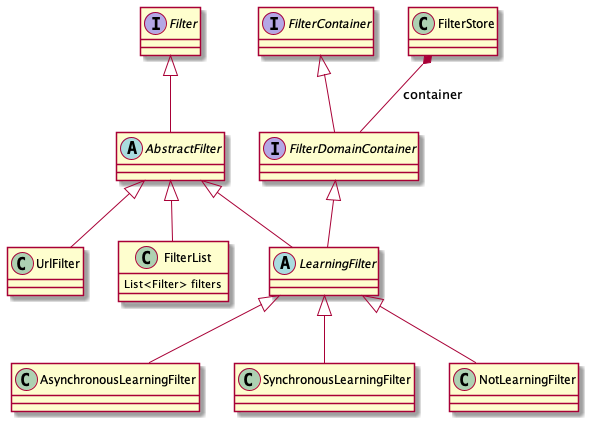
Requests that eBlocker receives via ICAP are processed by the pattern blocker. It has access to the full URLs.
Pattern filters are defined in the EasyList format.
Each filter rule is parsed and a UrlFilter is created from it.
Filter lists are organized in categories, e.g. ads, trackers, malware. The built-in filter lists are defined in patternfilters.json. Each object in this file is a FilterStoreConfiguration that is saved in Redis.
The FilterManager
creates FilterStore objects from the configurations and
caches them in encrypted JSON files at
/opt/eblocker-icap/conf/filter/.
The FilterStore maps domains to the rules that have matched on their URLs. Since there are tens of thousands of rules, it is not feasible on a Raspberry Pi to check every rule for every request.
A LearningFilter learns the mapping from a domain to the rules its URLs have matched on.
There are two main learning filters:
For performance reasons the AsynchronousLearningFilter
should be used for large filter lists.
Filters for a specific domain (or the wildcard domain
*.*) are stored in a filter store as a FilterList.
The filters are sorted by priority
in the list.
If the pattern blocker blocks a URL, it usually returns an SVG image containing a transparent pixel.
To avoid the problem of an empty browser window an onload handler checks whether the SVG is loaded as the top document. In this case the browser is redirected to an eBlocker blocking page.
For some specific URLs surrogate scripts are returned instead of the SVG image.